Innovative Crumple Chair Design Blueprint
📝 Prompt
Design Concept: The Crumple Chair Core Philosophy: Translating the "controlled chaos" of a tossed paper ball into a sculptural, high-comfort seating experience.

Stage 1: Observation & Morphological Analysis The goal is to deconstruct the image of the crumpled paper into usable geometric data. Crease Mapping: Identify the primary "valley" and "ridge" lines. These represent potential structural ribs or seams in the chair. Faceted Planes: Break down the sphere into a series of non-uniform polygons. Each flat surface of the paper becomes a potential panel for the chair’s upholstery or shell. Shadow Study: Analyze how the "tossed" form creates deep recesses. These natural pockets guide where the user’s weight will be cradled.

Stage 2: Iterative Form Exploration Moving from a sphere to a seat through "Digital Crumpling." Subtractive Sculpting: Imagine the paper ball as a solid mass. Use Boolean operations to "carve out" a seating cavity that fits the human form while maintaining the external jagged texture. Tension Simulation: Use 3D software (like Rhino or Blender) to simulate a flat sheet of material being compressed. This ensures the folds look authentic and not "modeled." The "Toss" Logic: Experiment with gravity-based simulation dropping a digital mesh to see how it settles naturally, mimicking the "tossed" origin.

Stage 3: Ergonomic Translation & Blueprinting Refining the raw aesthetic into a functional object. The Comfort Core: Overlay a standard ergonomic template (Seating Angle: 105°–110°) over the crumpled form. Adjust the internal "folds" to provide lumbar support and pressure relief. Blueprint Generation: Create technical orthographic views (Front, Side, Top). Map out the dimensions: Seat Height: 450mm Total Width: 850mm Surface Smoothing: Maintain the sharp "paper edges" on the exterior shell while softening the interior contact points for skin comfort.

Stage 4: Structural Integration & Scaling Making the concept physically viable. The Skeleton: Design a hidden internal frame (likely CNC-bent steel rods or a 3D-printed lattice) that follows the most prominent ridges of the paper folds to provide rigidity. Material Selection: * Option A (High-End): Faceted, cast aluminum with a white powder coat. Option B (Soft): Vacuum-formed recycled plastic shell covered in "memory-fold" technical fabric that retains a wrinkled appearance.

Stage 5: Final Prototyping & Material Finish Textural Replication: Apply a matte, slightly porous finish to the material to mimic the tactile feel of heavy-bond paper. Lighting Contrast: Use directional studio lighting in the final renders to emphasize the "tossed" shadows, making the chair look like a giant piece of discarded inspiration. Design Tip: To keep the "tossed" look authentic, avoid symmetry. The most compelling aspect of a crumpled paper ball is its unique irregularity—ensure the left and right sides of the chair are balance-equivalent but not identical
🖼️ Example Output
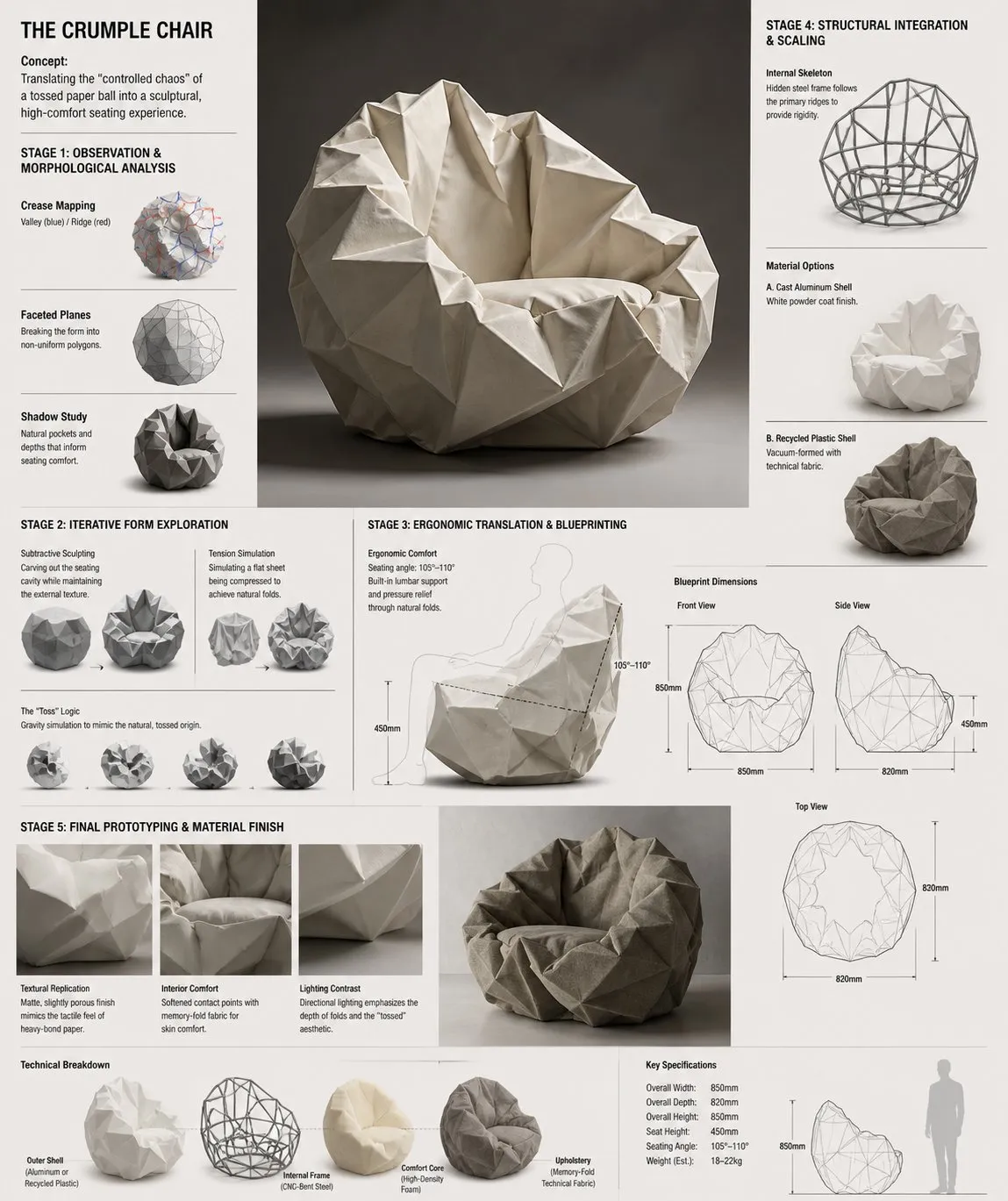
📖 Prompt Description
This Abstract, Design, Storyboard-themed AI image prompt creates a visually striking composition. Design Concept: The Crumple Chair Core Philosophy: Translating the "controlled chaos" of a tossed paper ball into a sculptural, high-comfort seating experience. The prompt leverages specific style keywords and technical parameters to guide the AI model toward producing a high-quality result. It works across all major AI image generators including GPT Image, Midjourney, Flux, and Stable Diffusion, though results may vary slightly between models. Each tool interprets the style keywords differently, giving you unique variations of the same creative concept.这个以Abstract、Design、Storyboard为主题的AI 图片 Prompt 能够创建视觉冲击力强的构图。Design Concept: The Crumple Chair Core Philosophy: Translating the "controlled chaos" of a tossed paper ball into a sculptural, high-comfort seating experience。该 Prompt 利用特定的风格关键词和技术参数,引导 AI 模型生成高质量的结果。它适用于所有主流 AI 图像生成器,包括 GPT Image、Midjourney、Flux 和 Stable Diffusion,但不同模型的结果可能略有差异。每个工具对风格关键词的解读不同,能够为你带来同一创意概念下的独特变体。
🎨 Style Analysis
Visual Style视觉风格
Studio — professional controlled lighting environment影棚 — 专业的受控灯光环境
Mood & Atmosphere氛围与情绪
Balanced and engaging, designed to capture attention while maintaining visual harmony平衡而吸引人,旨在抓住注意力同时保持视觉和谐
Lighting灯光
Studio — controlled professional lighting setup with key, fill, and rim lights影棚灯光 — 受控的专业灯光设置,包含主光、补光和轮廓光
Composition构图
Well-balanced composition that draws the viewer's eye to the main subject while providing visual context均衡的构图,将观者的视线引导至主体,同时提供视觉上下文
This prompt combines Studio visual elements with Balanced and engaging mood. The Studio enhances the overall atmosphere, while the Well-balanced composition that draws the viewer's eye to the main subject while providing visual context composition ensures the Abstract, Design, Storyboard elements are properly framed. Together these choices create a cohesive visual narrative that AI models can interpret effectively to produce high-quality Abstract, Design, Storyboard imagery.该 Prompt 融合了影棚的视觉元素与平衡而吸引人的氛围。影棚灯光增强了整体氛围,而均衡的构图,将观者的视线引导至主体,同时提供视觉上下文的构图确保Abstract、Design、Storyboard元素得到合理布局。这些选择的组合创造了连贯的视觉叙事,AI 模型能够有效解读并生成高质量的Abstract、Design、Storyboard图像。
🤖 Best AI Models for This Prompt
GPT Image (ChatGPT)
Versatile at following detailed prompt instructions. Produces well-composed images with good text rendering and consistent style.能够灵活遵循详细的 Prompt 指令。生成构图合理的图像,文本渲染和风格一致性良好。
Midjourney v6
Exceptional aesthetic quality and artistic interpretation. Excels at cinematic, painterly, and stylized outputs with stunning visual appeal.出色的美学品质和艺术表现力。擅长电影感、绘画感和风格化输出,视觉效果惊艳。
Flux Pro
Outstanding prompt adherence and photorealistic quality. Excellent at following specific style and lighting instructions precisely.出色的 Prompt 遵循度和照片级写实质量。精确执行特定的风格和光照指令。
Stable Diffusion XL
Highly customizable with ControlNet and LoRA support. Great for iterative refinement and achieving specific artistic styles through fine-tuning.支持 ControlNet 和 LoRA,高度可定制。适合迭代优化和通过微调实现特定艺术风格。
🚀 How to Use This Prompt
- Copy the prompt — Click the Copy button above to copy the full prompt text to your clipboard.复制 Prompt — 点击上方的复制按钮,将完整的 Prompt 文本复制到剪贴板。
- Open your AI tool — Launch Midjourney, ChatGPT, Flux, or your preferred AI image generator.打开你的 AI 工具 — 启动 Midjourney、ChatGPT、Flux 或其他你喜欢的 AI 图像生成器。
- Paste and generate — Paste the prompt into the text input and hit Generate. Wait for the AI to create your image.粘贴并生成 — 将 Prompt 粘贴到文本输入框中,点击生成。等待 AI 创建你的图片。
- Refine if needed — Adjust specific keywords (colors, style, subject) to fine-tune the result. Experiment with variations to get your ideal output.根据需要调整 — 调整特定关键词(颜色、风格、主题)来微调结果。尝试不同变体以获得理想输出。
⚙️ Prompt Parameters
🚫 Recommended Negative Prompt
          blurry, low quality, distorted, deformed, ugly, bad anatomy, watermark, text overlay, oversaturated, cartoon, anime
          模糊、低质量、变形、畸形、丑陋、解剖结构错误、水印、文字叠加、过饱和、卡通、动漫
🔗 Related Prompts
❓ Frequently Asked Questions
What AI tools support this prompt?哪些 AI 工具支持这个 Prompt?
This prompt works with GPT Image (ChatGPT), Midjourney, Flux, Stable Diffusion, DALL-E, and other AI image generators. Each model may produce slightly different interpretations — we recommend trying multiple tools to find the result that best matches your creative vision for Abstract, Design, Storyboard imagery.该 Prompt 适用于 GPT Image (ChatGPT)、Midjourney、Flux、Stable Diffusion、DALL-E 等主流 AI 图像生成器。不同模型可能产生略有差异的结果——建议尝试多种工具,找到最符合你Abstract、Design、Storyboard创作愿景的效果。
Can I modify this prompt?我可以修改这个 Prompt 吗?
Absolutely! This prompt is a starting template. You can adjust colors, styles, subjects, and composition details to match your specific needs. Try changing the lighting conditions, swapping the art style, or adding specific details to make it uniquely yours.当然可以!这个 Prompt 只是一个起始模板。你可以调整颜色、风格、主题和构图细节来满足具体需求。尝试改变光照条件、更换艺术风格或添加特定细节,让它成为你独一无二的作品。
How do I get better AI image results?如何获得更好的 AI 图像效果?
Be specific about style, lighting, composition, and mood in your prompts. Include artist references or technique names. Use negative prompts to exclude unwanted elements. Start with a clear subject description, then layer in details progressively. Iteration is key — generate, analyze, and refine.在 Prompt 中明确描述风格、光照、构图和氛围。引用艺术家或技法名称。使用负面 Prompt 排除不需要的元素。从清晰的主体描述开始,然后逐步添加细节。迭代是关键——生成、分析、优化。
Why use Abstract, Design, Storyboard prompts for AI image generation?为什么使用Abstract、Design、Storyboard类型的 Prompt 来生成 AI 图像?
Abstract, Design, Storyboard prompts help focus the AI model on specific visual elements and styles that are proven to produce compelling results. By using curated prompts from our library, you benefit from tested keyword combinations that consistently generate high-quality Abstract, Design, Storyboard images across different AI platforms.Abstract、Design、Storyboard类型的 Prompt 有助于引导 AI 模型聚焦于特定的视觉元素和风格,这些已被证实能产生出色的效果。通过使用我们精心整理的 Prompt 库,你可以利用经过验证的关键词组合,在不同 AI 平台上持续生成高质量的Abstract、Design、Storyboard图像。
Is this prompt free to use commercially?这个 Prompt 可以免费商用吗?
Yes, you can use and modify this prompt freely for personal and commercial projects. However, the generated images may have different usage rights depending on the AI tool you use. Always check the specific platform's terms of service for commercial usage of AI-generated content.是的,你可以自由使用和修改这个 Prompt,用于个人和商业项目。但生成的图像可能因使用的 AI 工具不同而有不同的使用权。请务必查看各平台关于 AI 生成内容商业使用条款。